

Description
Download Cigati HostGator Backup Tool – Free Windows Backup & Cloud Storage Solution
Overview of Cigati HostGator Backup Tool
The Cigati HostGator Backup Tool is a free Windows application designed to simplify the process of backing up website data to HostGator’s cloud infrastructure. Developed by Cigati Solutions, the tool belongs to the “Backup & Cloud Storage” category and targets small‑to‑medium website owners who need a reliable, automated way to protect their files, databases, and configuration settings. First published on Softonic on June 3, 2024, the current release (version 22.10) runs on Windows 11 and later, leveraging the latest OS security features to keep backup operations safe and efficient. While the software is still relatively new, early community feedback highlights its intuitive interface, one‑click backup creation, and seamless integration with HostGator accounts. Because it is offered at no cost, it is especially appealing for freelancers, bloggers, and small businesses that cannot justify the expense of premium backup suites. The tool also supports scheduled backups, compression options, and encryption, ensuring that your data is both space‑efficient and protected against unauthorized access.
Key Features and Benefits
- One‑Click Backup Creation: Instantly archive website files and databases with a single button press.
- Scheduled Backups: Configure daily, weekly, or monthly backup cycles to automate protection.
- HostGator Cloud Integration: Directly store backups in your HostGator account without third‑party intermediaries.
- Compression & Encryption: Reduce storage usage with ZIP compression and secure data with AES‑256 encryption.
- Version History: Retain multiple backup versions, allowing you to roll back to a previous state if needed.
- Easy Restoration: Restore individual files or entire sites from the backup manager interface.
- Resource‑Friendly: Runs in the background with low CPU and memory consumption, ideal for shared hosting environments.
- Free & No Ads: Completely free to download and use, with no hidden fees or intrusive advertising.
These features translate into tangible benefits for users. First, the one‑click approach removes technical barriers, enabling even non‑technical owners to safeguard their sites. Scheduled backups eliminate the risk of human forgetfulness, while compression keeps cloud storage costs low. Encryption ensures compliance with data‑privacy regulations such as GDPR, making the tool suitable for e‑commerce platforms handling customer information. Moreover, the version history provides a safety net against accidental deletions or malicious hacks, allowing you to revert to a known‑good state quickly. Because the application is lightweight, it does not interfere with website performance or other server tasks, preserving the end‑user experience. Finally, the free license and ad‑free environment mean that you can allocate your budget to other growth initiatives rather than recurring backup fees.
Installation, Usage Instructions, and Compatibility
Installing the Cigati HostGator Backup Tool is straightforward. Begin by downloading the installer from the official Cigati Solutions website or a trusted software repository such as Softonic. The .exe file is under 25 MB, making the download quick even on modest connections. Double‑click the installer, accept the license agreement, and follow the on‑screen prompts. The wizard will automatically detect your Windows version and suggest default installation paths; you can customize these if desired. Once the installation finishes, launch the application from the Start menu.
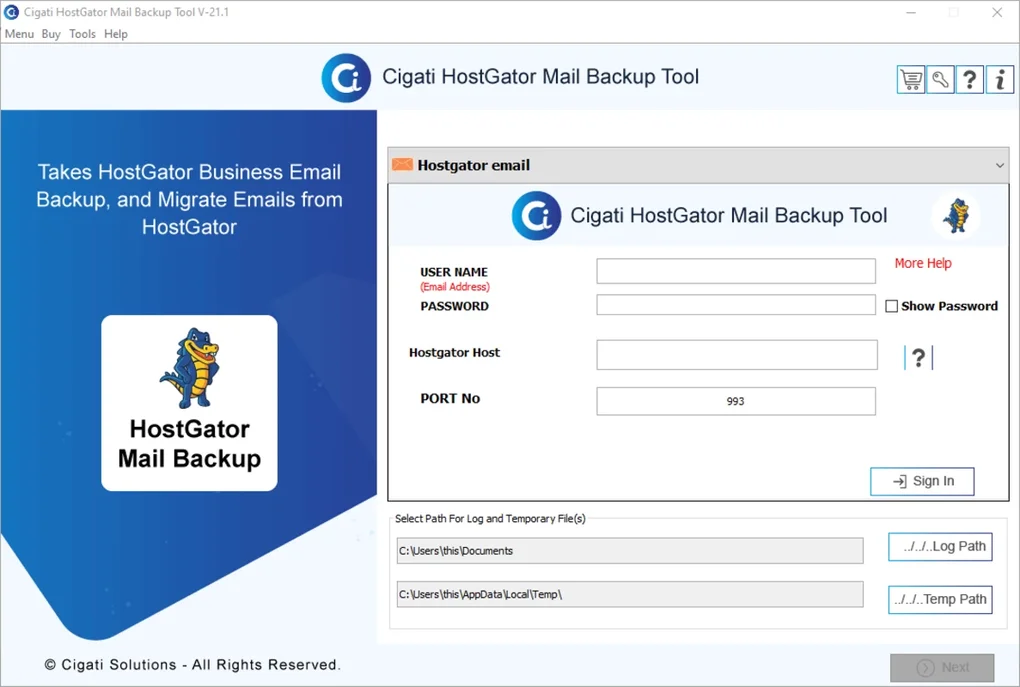
Upon first launch, you will be guided through a brief setup wizard. The wizard asks for your HostGator credentials (username and API token), which are stored locally in an encrypted configuration file. Next, select the website directory you wish to back up—either a local folder or a remote FTP path. You can also choose which MySQL databases to include; the tool automatically lists databases associated with the selected site. After confirming your selections, click Save & Run Backup to initiate the first backup. The progress bar provides real‑time feedback, and a detailed log is available for troubleshooting.
System Requirements: The backup tool requires Windows 11 or later. It leverages the modern PowerShell and .NET 6 runtime, which are built into Windows 11, ensuring compatibility and security. Minimum hardware specifications include a 1 GHz processor, 2 GB RAM, and 100 MB of free disk space for the application itself. Because backups are stored in the cloud, additional local storage is only needed for temporary staging files, which are automatically cleaned up after successful upload.
Using the tool after the initial backup is simple. The main dashboard displays the most recent backup status, upcoming scheduled tasks, and quick actions for “Create New Backup” or “Restore”. To modify the backup schedule, navigate to the Settings tab, where you can set the frequency, retention period, and notification preferences (email or Windows toast alerts). The application also supports command‑line execution, enabling integration with custom scripts or Windows Task Scheduler for advanced automation scenarios.
Pros, Cons, Frequently Asked Questions, and Final Verdict
Pros & Cons
- Pros:
- Completely free with no hidden charges.
- One‑click backup and restore for fast recovery.
- Native integration with HostGator cloud storage.
- Scheduled backups eliminate manual effort.
- Compression and AES‑256 encryption keep data safe and efficient.
- Lightweight, low resource consumption.
- Cons:
- Limited to Windows 11 and newer – no support for older Windows versions.
- Only works with HostGator accounts; other hosting providers are not supported.
- Advanced users may miss granular settings found in premium backup suites.
Frequently Asked Questions
Is the Cigati HostGator Backup Tool really free?
Yes, the tool is completely free to download and use. There are no subscription fees or hidden costs, and you can create unlimited backups to your HostGator account.
Can I back up multiple websites with a single installation?
Absolutely. After the initial configuration, you can add additional site profiles within the application and manage backups for each site independently.
What happens if my backup fails?
The tool logs the error details and sends a notification (if enabled). Failed backups are automatically retried based on the schedule you set, and you can manually retry from the dashboard.
Does the backup include my database?
Yes. During the setup wizard you can select one or more MySQL databases associated with your website. The tool creates a dump of each selected database and includes it in the backup archive.
Can I restore a backup to a different HostGator account?
Yes, you can export the backup file and then import it into any HostGator account that you have access to, making migrations and testing environments easy to set up.
Conclusion & Call to Action
In summary, the Cigati HostGator Backup Tool offers a compelling blend of simplicity, security, and cost‑effectiveness for Windows users who rely on HostGator hosting. Its free price tag, one‑click operation, and robust encryption make it an attractive choice for anyone looking to protect their website without juggling multiple premium services. While the lack of cross‑provider support may be a drawback for some, the tool excels in its niche and delivers reliable performance on modern Windows systems. If you’re ready to safeguard your site with a hassle‑free solution, download Cigati HostGator Backup Tool today and start creating secure backups in minutes.
This backup utility hits the sweet spot between functionality and ease of use. The integration with HostGator is seamless, and the encryption gives peace of mind. For anyone on Windows 11 looking for a zero‑cost backup solution, it’s a solid pick.
Guides & Tutorials for Cigati HostGator Backup Tool
How to install Cigati HostGator Backup Tool
- Click the Preview / Download button above.
- Once redirected, accept the terms and click Install.
- Wait for the Cigati HostGator Backup Tool download to finish on your device.
How to use Cigati HostGator Backup Tool
This software is primarily used for its core features described above. Open the app after installation to explore its capabilities.
User Reviews for Cigati HostGator Backup Tool 0
No reviews found





